


AudioLab Audio Cutter & Editor
4.76.66K Reviews
App Specs
- Version
- 1.3.24
- Updated On
- License
- Free
- Downloads
- 10,000,000+
- Developer
- HitroLab - Mp3 Audio Editor and Ringtone Maker Dev
- Categories
- Music & Audio
- Platform
- Android, iOS
Screenshots
 Analysis by AppCompare
When I need to turn a sound idea into something usable without sitting at a computer, I want an app that helps me move from rough recording to a finished clip without making every step feel like a separate project. AudioLab Audio Cutter & Editor is built around that kind of practical, phone-first work: it brings common audio tasks together, so I can record, trim, combine, and shape sound in one place. I find that breadth most appealing for quick creative jobs, rather than for replacing a full desktop studio.
A useful starting point for small audio projects
AudioLab is a free music and audio app from HitroLab - Mp3 Audio Editor and Ringtone Maker Dev. It has a 4.7 average from around 329,000 ratings, and has been installed over 10 million times. The app is rated for Everyone, and its current version is 1.3.24. There are in-app purchases, with items priced from $0.99 to $59.99, so I’d check what is included in the version I’m using before relying on a paid tool for a regular workflow.
The strongest reason I’d open it is that my starting point does not need to be a polished recording. I might have a voice memo, a music file, or a short sound I want to reuse, and the app’s editing and recording tools give me a place to work on it without first moving to a laptop. That makes it a sensible fit for personal projects, simple social clips, rough podcast material, and custom phone sounds.
It is less convincing as the central tool for a complex production with many takes, detailed automation, or a team passing files back and forth. A mobile editor is convenient precisely because it keeps the job close at hand, but that convenience comes with a smaller working surface and fewer reasons to expect the control of a dedicated desktop audio workstation. I’d treat AudioLab as a practical pocket editor, not as a shortcut to a professional studio setup.
The All-in-One Audio Experience
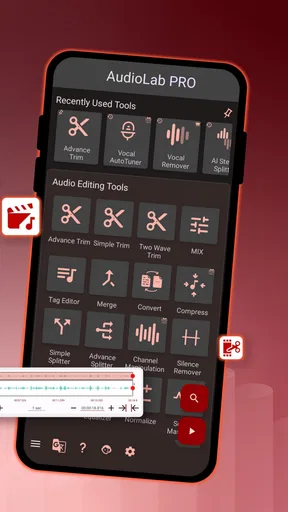
When I first opened AudioLab Audio Cutter & Editor, I was immediately drawn to its clean and straightforward interface. No overwhelming buttons or clutter, just a well-organized dashboard that greets you with all the essential tools. It's like having a mini recording studio right in your pocket.
Easy Peasy Editing
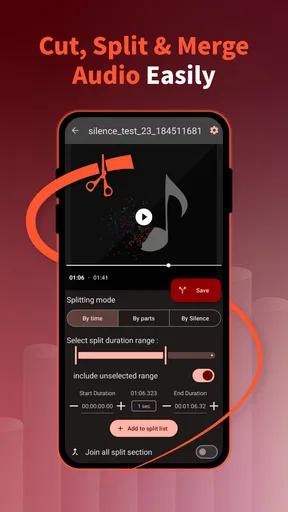
Let's talk about the bread and butter of this app: the audio cutting and editing features. I found the process to be incredibly intuitive. Just select a track, and you can easily trim, cut, or even merge audio files. The waveforms are clear and responsive, making it a breeze to pinpoint exactly where you need to make your edits.
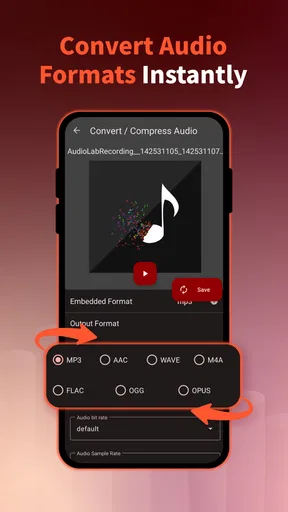
One of the coolest features is the ability to merge multiple tracks. This is perfect if you're looking to create a mashup or a podcast intro. The app supports various formats, so you won't have to worry about compatibility issues. It’s as simple as selecting your files and letting AudioLab do its magic.
Worth Reading Before You Choose

Flipboard Shows What News Apps Must Do Beyond the Feed

Switching to Android Auto Means Rethinking Your Driving Routine

Google Calendar Makes a Crowded Week Easier to Manage

Ludo King Makes the Most of the Minutes Between Plans

Baby Panda World Brings Quick Play to Modern Phones, but Its Game Library Feels Busy

ESPN’s Live Game View Makes Following Close Games Easier
A cleaner workflow when editing on a phone
For a short clip, I’d start by making a copy of the source file and trimming that copy, rather than treating the original as disposable. It is a simple habit, but it matters when one recording needs to serve several purposes: a longer version for a spoken post, a tighter excerpt for a message, and a brief sound for a ringtone. Keeping the untouched source gives me room to revise without having to recreate the recording.
Waveforms are especially useful when I’m editing speech, because pauses and louder phrases are easier to spot visually than by repeatedly listening from the beginning. I still play the cut back before saving, though. A waveform can help me find a likely edit point, but it cannot tell me whether a sentence sounds natural after the cut or whether a breath has been chopped off. For dialogue, I prefer to leave a little air around the words rather than trimming every silence to the edge.
Merging tracks is convenient for a simple sequence, but I would plan the order and rough levels before combining anything. If a voice clip and music bed are meant to sit together, listening to the transition at normal volume is more useful than judging each file separately. The practical trade-off is that a quick merge can make a short intro or personal mix easy to assemble, while revisions may take more care if I have already committed several pieces into one result.
Mixing and Mastering Like a Pro
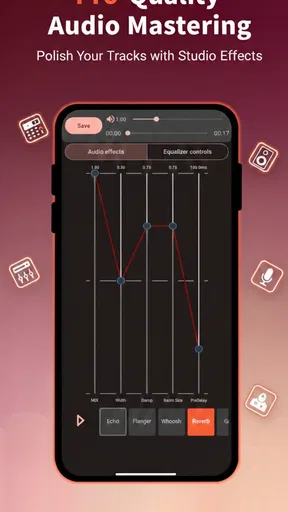
Beyond basic editing, AudioLab offers a suite of mixing tools. You can adjust volumes, add effects, or even play around with the equalizer to fine-tune your sound. I found the reverb and echo effects to be particularly impressive, allowing you to add a professional touch to your tracks.
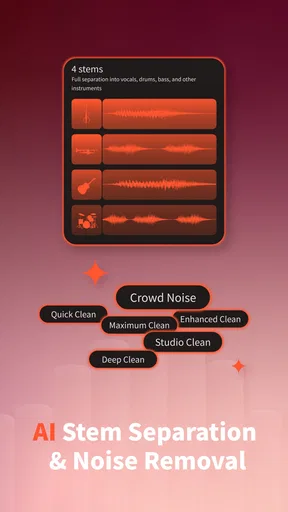
The app also features a robust noise reduction tool. I tested it on a recording with a fair amount of background noise, and it did an admirable job of cleaning up the audio without distorting the main track. It’s definitely a handy feature if you're recording in less-than-ideal conditions.
Using effects with restraint
Effects can make a rough recording feel more intentional, but I would apply them for a reason rather than simply because they are available. Reverb can soften a dry voice or give a sound more space; too much can make words harder to understand. Echo can be fun on a musical phrase or a deliberately stylized spoken line, but it is usually a poor fit for instructions, interviews, or narration where clarity comes first.
I also treat noise reduction as repair, not a guarantee that any recording can be rescued. It is most useful when the unwanted sound is steady and the voice or main audio remains clear. If the background is loud, changes constantly, or overlaps the speaker, aggressive cleanup can make the result sound unnatural. My practical approach is to compare the cleaned version with the original and keep the treatment modest if the voice starts losing its natural texture.
Ringtone and Notification Wizard
Ever wanted to create custom ringtones or notification sounds? AudioLab makes this super easy. I had fun chopping up some of my favorite songs and setting the best parts as my ringtone. The app allows you to save and apply these directly, which is a nice touch.
A practical everyday job: a sound that fits your phone
For a personal ringtone, I’d choose a short section with a clear opening rather than a passage that takes several seconds to build. I would also listen to it at the sort of volume I normally use on my phone: a detail that sounds fine through headphones may be too quiet or too busy to recognize in a noisy room. This is a small example of where editing for the final use matters more than making the clip sound impressive in isolation.
The same thinking helps with notification sounds. A brief, distinct cue is easier to recognize than a miniature song, and a clean ending keeps it from feeling abrupt. If I’m making several tones, I’d give them noticeably different character so I can tell them apart without checking the screen. AudioLab is most useful here because the task is self-contained: choose a source, find the moment, trim it, then use the result on the device.
Recording On the Go
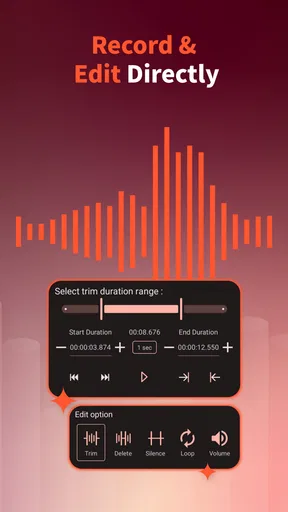
Another feature I found useful is the recording capability. Whether you're capturing a quick voice note or recording an impromptu podcast episode, AudioLab has you covered. The recording quality is top-notch, and the app provides options to edit right after recording, which streamlines the process significantly.
From quick capture to something shareable
A realistic use case is recording a short voice update between errands, then removing the dead air at the beginning and end before sending it to a friend or using it in a simple post. I’d first check that the phone is close enough to capture a clear voice, then record in the quietest spot available; editing can tidy pauses, but it cannot replace a clean source. Once recorded, trimming the start and finish makes the clip feel deliberate without turning a quick task into a full production session.
For a podcast or longer spoken piece, I’d be more cautious. A phone recording is handy for capturing an idea or a temporary take, but a longer project benefits from careful monitoring, a consistent recording setup, and a way to keep versions organized. AudioLab’s immediate edit-after-recording path is a real convenience for brief work; it is not, by itself, a reason to skip a more controlled setup when the final recording needs to sound consistent from start to finish.
What it does well compared with other audio tools
Compared with a basic voice recorder, AudioLab makes more sense when I want to do something with the recording right away: trim it, join it to another file, or shape it for a specific use. Compared with a single-purpose ringtone maker, it offers a wider route from source audio to finished clip. That combination can reduce the small but annoying handoffs between separate apps, especially for personal projects that do not need advanced production features.
On the other hand, someone who only needs to record reminders may be better served by the simplest recorder already available on their device. A dedicated desktop editor is a better choice when I need detailed control over a long arrangement, precise multi-track work, or a larger screen for repeated revisions. The choice is less about which tool is universally best and more about whether the job is a quick edit that benefits from being on a phone or a production that deserves a fuller workstation.
User Experience: Smooth Sailing
The app is smooth and responsive, with no noticeable lag, even when working with larger files. It's clear that a lot of thought went into optimizing performance. The developers have managed to pack a ton of functionality into an app that remains light on resources.
Navigation is intuitive, and the help section is comprehensive if you ever find yourself stuck. Plus, there’s a vibrant community of users sharing tips and tricks online, which is always a bonus.
AudioLab also offers a range of customization options. You can tweak the app's appearance to suit your style, which adds a personal touch to the user experience.
Small checks that save a finished edit
Before I hand off or reuse a clip, I listen from just before the first edit through the end, rather than checking only the middle. That catches a clipped consonant, an awkward jump, or an ending that cuts off too sharply. I also keep the intended destination in mind: a ringtone needs to announce itself quickly, while spoken material should preserve enough natural pauses to remain comfortable to hear.
If I’m preparing something to share, I’d make sure the saved result is the version I meant to keep and play it outside the editing screen if possible. This is a useful safeguard because an edit can sound convincing while I’m focused on the waveform, yet feel too loud, too quiet, or oddly paced in ordinary playback. For repeated work, naming files clearly is worth the extra moment; “final” stops being helpful once there are several versions.
There is also a practical learning curve hidden in the app’s range. Having many tools close together is useful when I know what I want, but a newcomer may need to explore before deciding which path suits a particular job. I would begin with one simple task, such as trimming a voice note, then try combining or treating audio only when the basic edit is already working. That keeps the extra options from turning a small project into unnecessary tinkering.
Who should choose it—and who may not need it
I’d recommend AudioLab to someone who regularly makes short audio pieces on a phone: people creating personal ringtones, trimming recordings, assembling a simple intro, or cleaning up a quick voice capture. It is also a reasonable option for a creator who wants a mobile utility beside a larger editing setup, especially for rough cuts and small fixes away from a desk.
I would skip it if my only need were occasional voice notes, since a basic recorder may already cover that comfortably. I’d also look elsewhere for demanding music production, detailed podcast post-production, or collaborative work where careful project management and extensive revision are central. The app’s broad toolset is appealing, but breadth should not be mistaken for the depth or workflow of a dedicated production environment.
It is free to download, though in-app purchases range from $0.99 to $59.99 per item. That makes it sensible to try the core workflow first and decide whether any paid option solves a recurring need, rather than paying simply because a feature appears in the interface. Its minimum operating system is Android 8.0, which is worth checking before installing on an older Android device.
Final Thoughts
In a market flooded with audio editing apps, AudioLab Audio Cutter & Editor stands out with its user-friendly design and powerful features. Whether you're a casual user looking to create custom ringtones or a more serious audiophile needing a mobile editing suite, AudioLab has something for everyone.
It’s a solid choice for anyone needing a reliable audio editing tool on the go. So, if you're in the market for a versatile app that won't bog down your device, give AudioLab a shot. It might just become your new favorite audio companion.
My recommendation is to judge it by one real task you do often, not by the number of tools on the dashboard. Make a ringtone, trim a memo, or prepare a short voice clip and see whether the end-to-end process feels comfortable. If it does, the convenience of recording and editing in one place is a genuine advantage; if your work quickly demands more precise control, a dedicated editor will be the better next step.
Pros
- Intuitive interface for easy navigation.
- Wide range of audio editing tools.
- Supports multiple audio formats.
- Real-time audio effects application.
- Minimal ads for a free app.
Cons
- Limited features in free version.
- Occasional app crashes reported.
- Exporting can be slow at times.
- No cloud storage integration.
- Interface could use a modern update.
FAQs for AudioLab Audio Cutter & Editor
What features does AudioLab offer for audio editing?
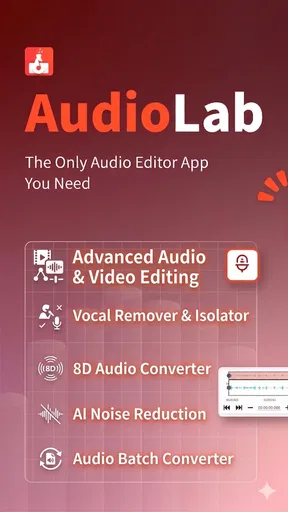
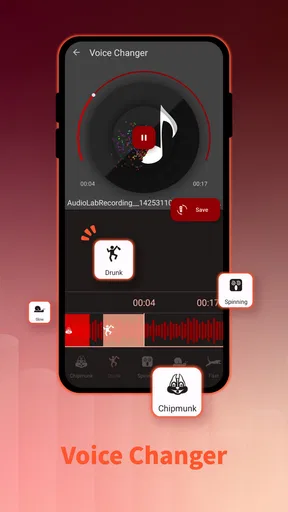
AudioLab provides a comprehensive suite of features including audio cutting, mixing, merging, and trimming. Users can also apply effects, change audio formats, and record live audio. Additionally, it offers noise reduction and voice modulation, making it a versatile tool for both casual users and professionals.
Is AudioLab free to use, or are there any in-app purchases?
AudioLab is free to download and use, but it includes in-app purchases to unlock advanced features and remove ads. The free version offers a wide range of functionalities, but purchasing the premium version enhances the user experience by providing additional tools and an ad-free interface.
Can I use AudioLab to edit video audio tracks?
Yes, AudioLab allows users to extract and edit audio from video files. This feature is particularly useful for content creators who need to refine the audio of their video projects. Users can import videos, edit the audio separately, and export the final product with ease.
What audio formats does AudioLab support?
AudioLab supports a variety of audio formats including MP3, WAV, AAC, M4A, and more. This wide range of compatibility ensures that users can work with their preferred formats and export their projects in the format that best suits their needs, making it a flexible option for all types of users.
Is AudioLab user-friendly for beginners?
AudioLab is designed to be user-friendly, with an intuitive interface that guides users through its features step-by-step. Beginners will find the app easy to navigate, while more experienced users can take advantage of its advanced features. Tutorials and help sections are also available to assist new users.


